Converting and downloading file
The document conversion service is part of ONLYOFFICE Docs. It converts document files between supported formats — either to prepare them for editing or to export them in a format the user needs.
The document editor works with files in the editors' native formats: .docx for documents, .xlsx for spreadsheets, .pptx for presentations, or .pdf for PDFs.
Default behavior
The document editing service converts files to the native format automatically when opening them — the integrator does not need to call the conversion API. When saving, the assemblyFormatAsOrigin server setting (enabled by default) ensures the file is converted back to its original format. For details, see saving in original format.
Converting before editing
If the integrator needs to convert files before passing them to the editor — for example, to store them in a native format — they can use the conversion API explicitly.
The figure and steps below explain this process.
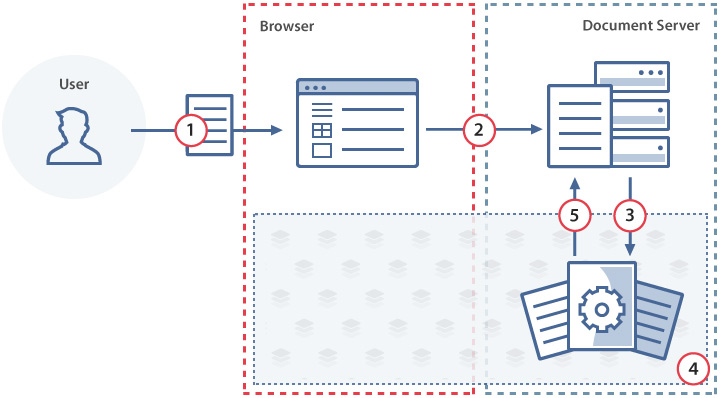
- The user selects a file to upload to the document manager.
- The document manager uploads the file to the document storage service.
- The document storage service sends the file to the document conversion service for conversion into the appropriate native format using the conversion API.
- The document conversion service converts the file to the native format.
- The document storage service downloads the converted file.
Converting for download
When the user needs to download a file in a format other than the native one — whether from the document manager or directly from the document editor — the document conversion service converts it before download.
From the document manager
The figure and steps below explain the download process from the document manager.
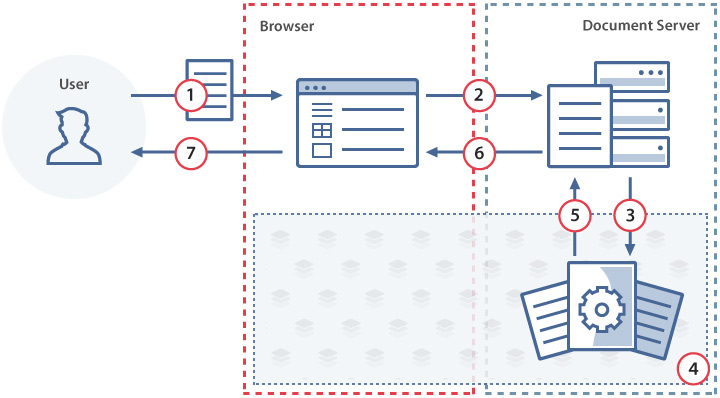
- The user selects a file in the document manager and chooses the download format.
- The document manager sends the request to the document storage service.
- The document storage service sends the file to the document conversion service for conversion into the requested format using the conversion API.
- The document conversion service converts the file to the requested format.
- When the conversion is finished, the document storage service downloads the converted file.
- The document storage service sends the converted file to the document manager.
- The document manager provides the converted file to the user for download.
From the document editor
- The user chooses the download format in the document editor.
- The document editor sends the current document state to the document editing service.
- The document editing service sends the file to the document conversion service for conversion into the requested format.
- The document conversion service converts the file to the requested format.
- The document editing service sends the converted file to the document editor.
- The document editor provides the converted file to the user for download.