Customizing themes
You can create custom interface themes for ONLYOFFICE Docs by adding JSON configuration files to the themes directory on the server.
Creating a theme file
Create a .json file with the following structure:
{
  "name": "Amazing theme",
  "l10n": {
    "fr": "Thème incroyable",
    "de": "Geweldig thema"
  },
  "id": "theme-amazing",
  "type": "light",
  "colors": {
    "toolbar-header-document": "#446995",
    "toolbar-header-spreadsheet": "#40865c",
    "toolbar-header-presentation": "#aa5252",
    "border-color-shading": "rgba(0, 0, 0, 0.15)",
    ...
  }
}
Parameters
| Parameter | Type | Description |
|---|---|---|
name | string | The theme display name shown in the theme picker. |
l10n | object | Localized theme names. Keys are two-letter language codes, values are translated names. |
id | string | A unique theme identifier. Must start with theme- and can contain a-Z, 0-9, -, _. |
type | string | The base theme type: dark or light. |
colors | object | Color definitions in hex (#446995) or RGBA (rgba(0, 0, 0, 0.15)) format. |
Deploying the theme file
Place the .json file in the themes directory:
- Docker
- Linux
- Windows
sudo docker cp /path/theme-file.json {container_id}:/var/www/onlyoffice/documentserver/web-apps/apps/common/main/resources/themes
cp /path/theme-file.json /var/www/onlyoffice/documentserver/web-apps/apps/common/main/resources/themes
copy C:\path\theme-file.json "%ProgramFiles%\ONLYOFFICE\DocumentServer\web-apps\apps\common\main\resources\themes"
The server cache refreshes every 5 minutes. After placing the file, refresh the editor page. In some cases, you may need to restart the services and clear the cache for changes to appear.
Once deployed, the theme will be available in the View tab > Interface Theme.
Applying custom themes via API
To apply a custom theme through the editor initialization config, pass its id to the editorConfig.customization.uiTheme parameter:
const config = {
  editorConfig: {
    customization: {
      uiTheme: "theme-amazing",
    },
  },
}
Color parameters
The colors object supports the following parameters. All default values correspond to the built-in light theme.
Header toolbar
| Parameter | Default | Description | Example |
|---|---|---|---|
toolbar-header-document | #446995 | The toolbar header color for text documents. |  |
toolbar-header-spreadsheet | #40865c | The toolbar header color for spreadsheets. |  |
toolbar-header-presentation | #BE664F | The toolbar header color for presentations. |  |
toolbar-header-pdf | #AA5252 | The toolbar header color for PDFs. |  |
text-toolbar-header-on-background-document | #38567A | The text color of user initials in the text documents toolbar header. |  |
text-toolbar-header-on-background-spreadsheet | #336B49 | The text color of user initials in the spreadsheets toolbar header. |  |
text-toolbar-header-on-background-presentation | #854535 | The text color of user initials in the presentations toolbar header. |  |
text-toolbar-header-on-background-pdf | #8D4444 | The text color of user initials in the PDFs toolbar header. |  |
Background
| Parameter | Default | Description | Example |
|---|---|---|---|
background-normal | #fff | The background color of windows, drop-down panels, and regular controls. |  |
background-toolbar | #f7f7f7 | The background color of the toolbar, all panels, and the dialog box header. |  |
background-toolbar-additional | #efefef | The additional toolbar background color for inactive sheets. |  |
background-primary-dialog-button | #444 | The background color of the primary dialog button. |  |
background-accent-button | #446995 | The background color of the accent button in the text document editor. |  |
background-tab-underline | #444 | The background color of the tab underline for the gray toolbar. |  |
background-notification-popover | #fcfed7 | The background color of the notification popover. |  |
background-notification-badge | #ffd112 | The background color of icon notification badges. |  |
background-scrim | rgba(0, 0, 0, 0.2) | The scrim color reducing the background intensity of modal windows. |  |
background-loader | rgba(24, 24, 24, 0.9) | The loader background color. |  |
background-alt-key-hint | #FFD938 | The background color of button shortcut hints when the Alt key is pressed. |  |
background-contrast-popover | #fff | The background color of information tips. |  |
background-fill-button | #FFD112 | The background color of the button from the form header. |  |
shadow-contrast-popover | rgba(0, 0, 0, 0.3) | The shadow color of information tips. |  |
Highlight
| Parameter | Default | Description | Example |
|---|---|---|---|
highlight-button-hover | #e0e0e0 | The highlight color of buttons, drop-down menu items, and other interactive lists on hover. |  |
highlight-button-pressed | #cbcbcb | The pressed button highlight color. |  |
highlight-button-pressed-hover | #bababa | The pressed button highlight color on hover. |  |
highlight-primary-dialog-button-hover | #1c1c1c | The highlight color of the primary dialog button on hover. |  |
highlight-accent-button-hover | #375478 | The highlight color of the accent button on hover. | 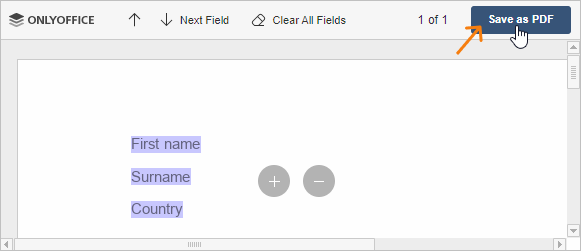 |
highlight-accent-button-pressed | #293f59 | The highlight color of the pressed accent button. |  |
highlight-header-button-hover | rgba(255, 255, 255, 0.15) | The highlight color of the header button on hover. |  |
highlight-header-button-pressed | rgba(255, 255, 255, 0.25) | The highlight color of the pressed header button. |  |
highlight-toolbar-tab-underline | #444 | The highlight color of the active tab underline for the gray toolbar. | |
highlight-text-select | #3494fb | The highlight color of selected text in regular controls. |  |
highlight-fill-button-hover | #FFE165 | The highlight color of the form header button on hover. |  |
highlight-fill-button-pressed | #DFB500 | The background color of the pressed button from the form header. |  |
Border
| Parameter | Default | Description | Example |
|---|---|---|---|
border-toolbar | #cbcbcb | The border color of the toolbar, panels, and modal windows. |  |
border-toolbar-active-panel-top | #f7f7f7 | The border color of the top toolbar active panel. | 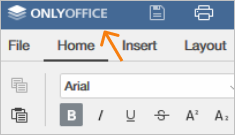 |
border-divider | #dfdfdf | The color of borders that divide toolbar and panel elements. |  |
border-regular-control | #c0c0c0 | The border color of regular controls. |  |
border-toolbar-button-hover | #e0e0e0 | The general border color for toolbar buttons placed together on hover. |  |
border-preview-hover | #bababa | The border color of preview control elements on hover. |  |
border-preview-select | #888 | The border color of pressed preview control elements. |  |
border-control-focus | #848484 | The border color of focused regular controls. |  |
border-color-shading | rgba(0, 0, 0, 0.15) | The border color of the palette colors. |  |
border-error | #f62211 | The border color of input boxes when entering an invalid value. |  |
border-contrast-popover | #fff | The border color of information tips. |  |
border-button-pressed-focus | #848484 | The border color of focused pressed buttons. |  |
Text
| Parameter | Default | Description | Example |
|---|---|---|---|
text-normal | rgba(0, 0, 0, 0.8) | The default text color. |  |
text-normal-pressed | rgba(0, 0, 0, 0.8) | The text color of active elements (selected tabs, pressed buttons). |  |
text-secondary | rgba(0, 0, 0, 0.6) | The secondary text color (notes, explanations). |  |
text-tertiary | rgba(0, 0, 0, 0.4) | The tertiary text color (placeholders). |  |
text-link | #445799 | The text color of links and link buttons in notification popovers. |  |
text-link-hover | #445799 | The text color of links and link buttons on hover in popovers. |  |
text-link-active | #445799 | The text color of pressed links and link buttons in popovers. | |
text-link-visited | #445799 | The text color of visited links and link buttons in popovers. |  |
text-inverse | #fff | The text color on the inverted toolbar background. |  |
text-toolbar-header | #fff | The text color of the toolbar header. |  |
text-contrast-background | #fff | The text color for the contrast background (loader, cell titles). |  |
text-alt-key-hint | rgba(0, 0, 0, 0.8) | The text color of button shortcut hints when the Alt key is pressed. |  |
Icon
| Parameter | Default | Description | Example |
|---|---|---|---|
icon-normal | #444 | The icon color. |  |
icon-normal-pressed | #444 | The icon color of active elements (selected tabs, pressed buttons). |  |
icon-inverse | #fff | The inverted icon color. | |
icon-toolbar-header | #fff | The icon color from the toolbar header (user initials icon). |  |
icon-notification-badge | #000 | The icon color of notification badges from the toolbar header. |  |
icon-contrast-popover | #fff | The icon color for contrast information tips. | |
icon-success | #090 | The color of resolved comment checkboxes or success indications. |  |
Canvas
| Parameter | Default | Description | Example |
|---|---|---|---|
canvas-background | #eee | The workspace background color behind the document page, sheet, or slide. |  |
canvas-content-background | #fff | The background color of the document page, cells, or slide. |  |
canvas-page-border | #ccc | The border color of the document page. |  |
canvas-ruler-background | #fff | The ruler background color. |  |
canvas-ruler-border | #cbcbcb | The ruler border color. |  |
canvas-ruler-margins-background | #d9d9d9 | The background color of ruler margins. |  |
canvas-ruler-mark | #555 | The color of ruler marks (target and text). |  |
canvas-ruler-handle-border | #555 | The border color of the ruler handle. |  |
canvas-ruler-handle-border-disabled | #aaa | The border color of the disabled ruler handle. |  |
canvas-high-contrast | #000 | The color of high-contrast elements (tab marks, grouped cell symbols). |  |
canvas-high-contrast-disabled | #666 | The color of disabled high-contrast elements. |  |
canvas-cell-border | rgba(0, 0, 0, 0.1) | The cell border color. |  |
canvas-cell-title-text | #444 | The text color of cell titles. |  |
canvas-cell-title-background | #f7f7f7 | The background color of cell titles. |  |
canvas-cell-title-background-hover | #dfdfdf | The background color of cell titles on hover. |  |
canvas-cell-title-background-selected | #cfcfcf | The background color of selected cell titles. |  |
canvas-cell-title-border | #d8d8d8 | The border color of cell titles. |  |
canvas-cell-title-border-hover | #c9c9c9 | The border color of cell titles on hover. |  |
canvas-cell-title-border-selected | #bbb | The border color of selected cell titles. |  |
canvas-scroll-thumb | #f1f1f1 | The scroll thumb color. |  |
canvas-scroll-thumb-hover | #cfcfcf | The scroll thumb color on hover. |  |
canvas-scroll-thumb-pressed | #adadad | The pressed scroll thumb color. |  |
canvas-scroll-thumb-border | #cfcfcf | The border color of the scroll thumb. |  |
canvas-scroll-thumb-border-hover | #cfcfcf | The border color of the scroll thumb on hover. |  |
canvas-scroll-thumb-border-pressed | #adadad | The border color of the pressed scroll thumb. |  |
canvas-scroll-arrow | #adadad | The scroll arrow color. |  |
canvas-scroll-arrow-hover | #f1f1f1 | The scroll arrow color on hover. |  |
canvas-scroll-arrow-pressed | #f1f1f1 | The pressed scroll arrow color. |  |
canvas-scroll-thumb-target | #cfcfcf | The target color of the scroll thumb. |  |
canvas-scroll-thumb-target-hover | #f1f1f1 | The target color of the scroll thumb on hover. |  |
canvas-scroll-thumb-target-pressed | #f1f1f1 | The target color of the pressed scroll thumb. |  |
canvas-sheet-view-cell-background | #73bf91 | The cell background color in Sheet View mode. |  |
canvas-sheet-view-cell-background-hover | #97e3b6 | The cell background color in Sheet View mode on hover. |  |
canvas-sheet-view-cell-background-pressed | #aaffcc | The pressed cell background color in Sheet View mode. |  |
canvas-sheet-view-cell-title-label | #121212 | The cell text color in Sheet View mode. |  |
canvas-sheet-view-select-all-icon | #3d664e | The Select All cells icon color in Sheet View mode. |  |
canvas-freeze-line-1px | #818181 | The freeze line color with shadow. |  |
canvas-freeze-line-2px | #aaaaaa | The freeze line color without shadow. |  |
canvas-select-all-icon | #82878f | The Select All cells icon color. | |
Full example
{
  "name": "Amazing theme",
  "l10n": {
    "fr": "Thème incroyable",
    "de": "Geweldig thema"
  },
  "id": "theme-amazing",
  "type": "light",
  "colors": {
    "toolbar-header-document": "#446995",
    "toolbar-header-spreadsheet": "#40865c",
    "toolbar-header-presentation": "#BE664F",
    "toolbar-header-pdf": "#AA5252",
    "text-toolbar-header-on-background-document": "#38567A",
    "text-toolbar-header-on-background-spreadsheet": "#336B49",
    "text-toolbar-header-on-background-presentation": "#854535",
    "text-toolbar-header-on-background-pdf": "#8D4444",

    "background-normal": "#fff",
    "background-toolbar": "#f7f7f7",
    "background-toolbar-additional": "#efefef",
    "background-primary-dialog-button": "#444",
    "background-accent-button": "#446995",
    "background-tab-underline": "#444",
    "background-notification-popover": "#fcfed7",
    "background-notification-badge": "#ffd112",
    "background-scrim": "rgba(0, 0, 0, 0.2)",
    "background-loader": "rgba(24, 24, 24, 0.9)",
    "background-alt-key-hint": "#FFD938",
    "background-contrast-popover": "#fff",
    "background-fill-button": "#FFD112",
    "shadow-contrast-popover": "rgba(0, 0, 0, 0.3)",

    "highlight-button-hover": "#e0e0e0",
    "highlight-button-pressed": "#cbcbcb",
    "highlight-button-pressed-hover": "#bababa",
    "highlight-primary-dialog-button-hover": "#1c1c1c",
    "highlight-accent-button-hover": "#375478",
    "highlight-accent-button-pressed": "#293f59",
    "highlight-header-button-hover": "rgba(255, 255, 255, 0.15)",
    "highlight-header-button-pressed": "rgba(255, 255, 255, 0.25)",
    "highlight-toolbar-tab-underline": "#444",
    "highlight-text-select": "#3494fb",
    "highlight-fill-button-hover": "#FFE165",
    "highlight-fill-button-pressed": "#DFB500",

    "border-toolbar": "#cbcbcb",
    "border-toolbar-active-panel-top": "#f7f7f7",
    "border-divider": "#dfdfdf",
    "border-regular-control": "#c0c0c0",
    "border-toolbar-button-hover": "#e0e0e0",
    "border-preview-hover": "#bababa",
    "border-preview-select": "#888",
    "border-control-focus": "#848484",
    "border-color-shading": "rgba(0, 0, 0, 0.15)",
    "border-error": "#f62211",
    "border-contrast-popover": "#fff",
    "border-button-pressed-focus": "#848484",

    "text-normal": "rgba(0, 0, 0, 0.8)",
    "text-normal-pressed": "rgba(0, 0, 0, 0.8)",
    "text-secondary": "rgba(0, 0, 0, 0.6)",
    "text-tertiary": "rgba(0, 0, 0, 0.4)",
    "text-link": "#445799",
    "text-link-hover": "#445799",
    "text-link-active": "#445799",
    "text-link-visited": "#445799",
    "text-inverse": "#fff",
    "text-toolbar-header": "#fff",
    "text-contrast-background": "#fff",
    "text-alt-key-hint": "rgba(0, 0, 0, 0.8)",

    "icon-normal": "#444",
    "icon-normal-pressed": "#444",
    "icon-inverse": "#fff",
    "icon-toolbar-header": "#fff",
    "icon-notification-badge": "#000",
    "icon-contrast-popover": "#fff",
    "icon-success": "#090",

    "canvas-background": "#eee",
    "canvas-content-background": "#fff",
    "canvas-page-border": "#ccc",
    "canvas-ruler-background": "#fff",
    "canvas-ruler-border": "#cbcbcb",
    "canvas-ruler-margins-background": "#d9d9d9",
    "canvas-ruler-mark": "#555",
    "canvas-ruler-handle-border": "#555",
    "canvas-ruler-handle-border-disabled": "#aaa",
    "canvas-high-contrast": "#000",
    "canvas-high-contrast-disabled": "#666",
    "canvas-cell-border": "rgba(0, 0, 0, 0.1)",
    "canvas-cell-title-text": "#444",
    "canvas-cell-title-background": "#f7f7f7",
    "canvas-cell-title-background-hover": "#dfdfdf",
    "canvas-cell-title-background-selected": "#cfcfcf",
    "canvas-cell-title-border": "#d8d8d8",
    "canvas-cell-title-border-hover": "#c9c9c9",
    "canvas-cell-title-border-selected": "#bbb",
    "canvas-scroll-thumb": "#f1f1f1",
    "canvas-scroll-thumb-hover": "#cfcfcf",
    "canvas-scroll-thumb-pressed": "#adadad",
    "canvas-scroll-thumb-border": "#cfcfcf",
    "canvas-scroll-thumb-border-hover": "#cfcfcf",
    "canvas-scroll-thumb-border-pressed": "#adadad",
    "canvas-scroll-arrow": "#adadad",
    "canvas-scroll-arrow-hover": "#f1f1f1",
    "canvas-scroll-arrow-pressed": "#f1f1f1",
    "canvas-scroll-thumb-target": "#cfcfcf",
    "canvas-scroll-thumb-target-hover": "#f1f1f1",
    "canvas-scroll-thumb-target-pressed": "#f1f1f1",
    "canvas-sheet-view-cell-background": "#73bf91",
    "canvas-sheet-view-cell-background-hover": "#97e3b6",
    "canvas-sheet-view-cell-background-pressed": "#aaffcc",
    "canvas-sheet-view-cell-title-label": "#121212",
    "canvas-sheet-view-select-all-icon": "#3d664e",
    "canvas-freeze-line-1px": "#818181",
    "canvas-freeze-line-2px": "#aaaaaa",
    "canvas-select-all-icon": "#82878f"
  }
}