IContextMenuItem
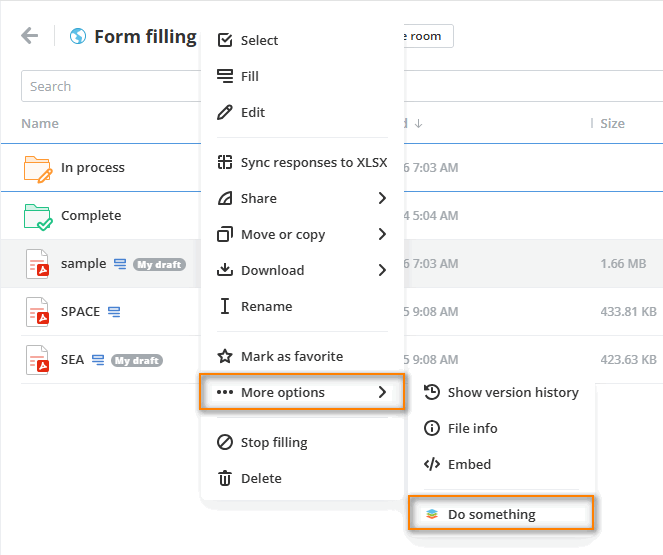
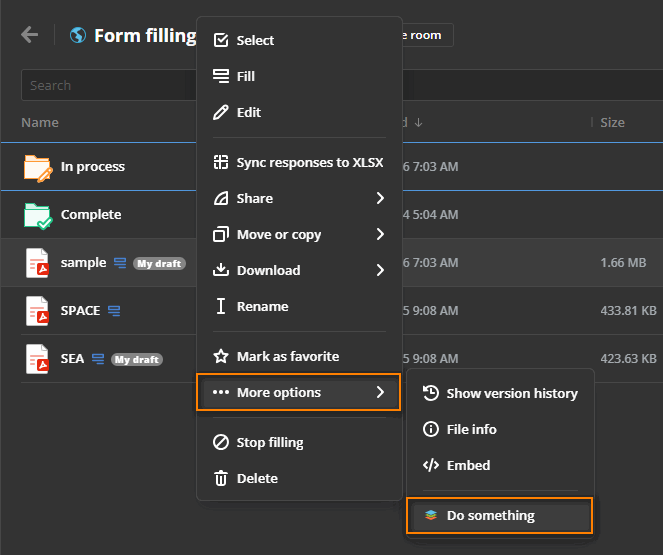
Describes an item that will be embedded in the context menu.
Items are registered by a plugin implementing
IContextMenuPlugin.
Examples
File analysis with progress reporting
const analyzeFile: IContextMenuItem = {
  key: "analyze-file",
  label: "Analyze File",
  icon: "analysis-icon.svg",
  onItemClick: async (fileId) => {
    try {
      const analysis = await analyzeFile(fileId);
      return {
        actions: [Actions.showToast],
        toastProps: [{
          type: ToastType.success,
          title: "Analysis completed successfully | Report generated | Ready to view"
        }]
      };
    } catch (error) {
      return {
        actions: [Actions.showToast],
        toastProps: [{
          type: ToastType.error,
          title: "Unable to analyze file | Check file access"
        }]
      };
    }
  }
};
Secure file sharing with clipboard integration
const shareFile: IContextMenuItem = {
  key: "share-file",
  label: "Share File",
  icon: "share-icon.svg",
  onItemClick: async (fileId) => {
    try {
      const shareInfo = await generateShareLink(fileId);
      return {
        actions: [Actions.showToast],
        toastProps: [{
          type: ToastType.success,
          title: "Link generated successfully | Ready to share | Copied to clipboard"
        }]
      };
    } catch (error) {
      return {
        actions: [Actions.showToast],
        toastProps: [{
          type: ToastType.error,
          title: "Unable to generate share link | Check permissions"
        }]
      };
    }
  }
};
Nested context menu items from previous examples
const manageFile: IContextMenuItem = {
  key: "manage-file",
  label: "Manage File",
  icon: "manage-file-icon.svg",
  items: [
    shareFile,
    analyzeFile
 ]
};
Group action for multiple selected items
const exportFiles: IContextMenuItem = {
  key: "export-files",
  label: "Export Selected",
  icon: "export-icon.svg",
  isGroupAction: true,
  fileType: [FilesType.file, FilesType.folder],
  onGroupClick: async (items) => {
    const count = items.length;

    const filesIds = items
                  .filter((item) => item.itemType === "file")
                  .map((item) => item.id);

    const foldersIds = items
                  .filter((item) => item.itemType === "folder")
                  .map((item) => item.id);

    return {
      actions: [Actions.showToast],
      toastProps: [{
        type: ToastType.success,
        title: `Exporting ${count} items...`
      }]
    };
  }
};
Properties
| Property | Type | Description |
|---|---|---|
key | string | The unique item identifier used by the service to recognize the item |
label | string | The item display name |
icon | string | The item display icon. The icon image must be uploaded to the assets folder. Only the image name with the extension must be specified in this field. The required icon size is 16x16 px. Otherwise, it will be compressed to this size. |
onClick? | (id: number) => void | Promise<void> | IMessage | Promise<IMessage> | Callback invoked when the action is triggered for a single selected file, folder, or room. Remarks: This callback is executed only for single selection. If isGroupAction is set to true, this callback will not be triggered. Deprecated: Use onItemClick instead to support both string and number IDs. This method will be removed in a future major version. |
onItemClick? | (id: string | number) => void | Promise<void> | IMessage | Promise<IMessage> | Callback invoked when the action is triggered for a single selected file, folder, or room. Supports both string and number identifiers. Remarks: This callback is executed only for single selection. If isGroupAction is set to true, this callback will not be triggered. This is the preferred method over the deprecated onClick. |
onGroupClick? | (items: GroupItem[]) => void | Promise<void> | IMessage | Promise<IMessage> | Callback invoked when the action is triggered for multiple selected files, folders, or rooms. Remarks: Each GroupItem in items exposes the entity id (number or string) and its itemType ("file", "folder", or "room"), so files, folders, and rooms can be distinguished within the selection. To make the action appear in the group actions menu, set isGroupAction to true. When isGroupAction is true, the action will not be shown for single selected items. |
isGroupAction? | boolean | Indicates whether this item should be displayed in the group actions context menu when multiple files, folders, or rooms are selected. |
withActiveItem? | boolean | Whether to add the action state to the item in the file list when the onItemClick (or the deprecated onClick) event is triggered. |
fileExt? | string[] | The extensions of files where the current item will be displayed in the context menu. It only works if FilesType.file is specified in the fileType parameter. If this parameter is not specified, then the current context menu item will be displayed in any file extension. |
fileType? | FilesType[] | The types of files where the current item will be displayed in the context menu. Presently the following file types are available: room, file, folder, image, video. If this parameter is not specified, then the current context menu item will be displayed in any file type. |
items? | Omit<IContextMenuItem, "items" | "placement">[] | Specifies elements as submenus. If specified, onItemClick (and the deprecated onClick) on the parent will not work. If none of the child elements are displayed, for example due to security or itemSecurity, the parent will also be hidden. Max level of the menu is 2. |
usersTypes? | UsersType[] | The types of users who will see the current item in the context menu. Currently the following user types are available: owner, docSpaceAdmin, roomAdmin, collaborator, user. If this parameter is not specified, then the current context menu item will be displayed for all user types. |
devices? | Devices[] | The types of devices where the current item will be displayed in the context menu. At the moment the following device types are available: mobile, tablet, desktop. If this parameter is not specified, then the current context menu item will be displayed in any device types. |
security? | Security[] | The security parameters of the parent folder or room that will be checked. If all the parameters are true, the current item will be displayed in the context menu. If this parameter is undefined, it will be ignored. |
itemSecurity? | ( | FilesSecurity | Security)[] | The security parameters of the file or folder or room that will be checked. If all the parameters are true, the current item will be displayed in the context menu. If this parameter is undefined, it will be ignored. |
placement? | "top" | "topLast" | Defines where the item appears in the context menu (top block only). - top — inserted at the very beginning of the menu, before all other items in the top block. - topLast — inserted at the end of the top block, just before the first separator. - If not specified, the item is placed inside the "More Options" submenu (default behavior). Only applies to root-level items. Nested items (items[]) ignore this property. |
itemId? | (string | number)[] | The identifiers of specific files, folders, or rooms where this item will be displayed in the context menu. If specified, the item is shown only for entities whose ID is included in this list. If this parameter is not specified, the item will be displayed for all entities (subject to other filters). |