跳到主要内容

FilesSelector

Portal only

Works only inside an ONLYOFFICE Apps portal: it needs the portal's API client, stores and translations, and is not part of the public API.

FilesSelector is a full file-system browser selector for navigating ONLYOFFICE Apps rooms, folders, and files.

Features​

  • Browse rooms & folders — Navigate the full file hierarchy with breadcrumb trail
  • Search — Enable with withSearch, scoped to the current folder/room
  • Room type filter — Restrict the root list to specific room types via roomType
  • File type filter — Filter by extension or type via filterParam
  • Footer input — Optionally show a file-name input field in the footer
  • Footer checkbox — Optional checkbox (e.g., "keep original") in the footer
  • Creation — Show a create-room button via withCreate + createDefineRoomLabel
  • Aside / embedded — Rendered inside an <Aside> panel by default; pass embedded to render inline
  • Portal on mobile — Automatically renders in a Portal on mobile/tablet devices
  • SSR support — Pre-populate with server-fetched data via withInit + initItems

Default​

Browse rooms and folders, then click Select to confirm. The submit button is enabled only when a folder is selected.
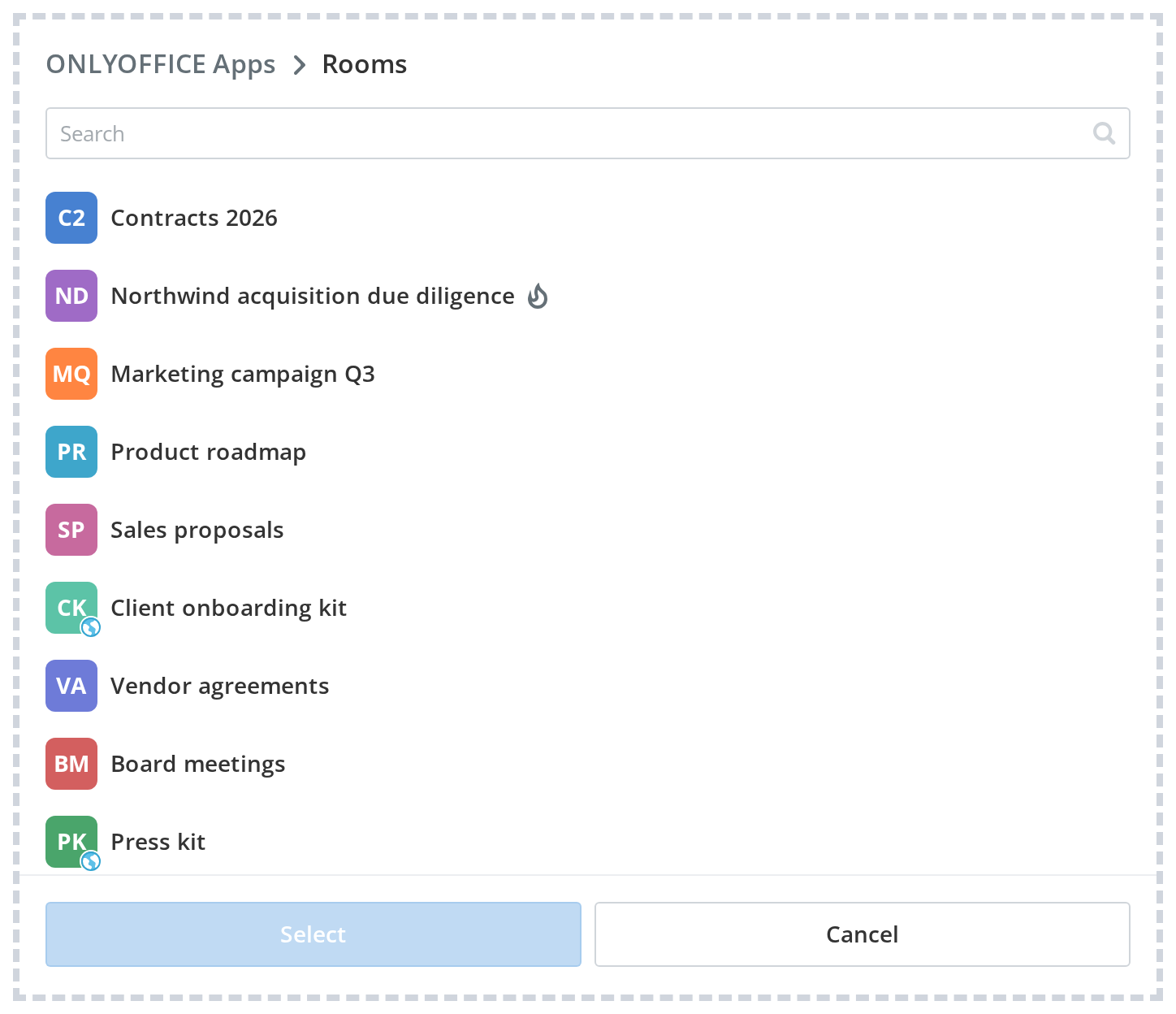
DefaultDefault
<FilesSelector
isPanelVisible={open}
embedded={false}
currentFolderId={0}
rootFolderType={FolderType.VirtualRooms}
currentDeviceType={DeviceType.desktop}
isRoomsOnly={false}
isThirdParty={false}
withSearch
withBreadCrumbs
withoutBackButton={false}
withCancelButton
withCreate={false}
withFooterInput={false}
withFooterCheckbox={false}
submitButtonLabel="Select"
cancelButtonLabel="Cancel"
footerInputHeader=""
currentFooterInputValue=""
footerCheckboxLabel=""
descriptionText=""
disabledItems={[]}
filesSettings={filesSettings}
onSubmit={(id, title) => console.log(id, title)}
onCancel={() => setOpen(false)}
getIsDisabled={getIsDisabled}
getFilesArchiveError={getArchiveError}
/>

Properties​

PropertyTypeDescription
isPanelVisible?booleanControls visibility of the Aside panel (non-embedded mode). Default: true.
embedded?booleanRender inline without the Aside/Backdrop wrapper — useful for embedding inside dialogs. Default: false.
currentDeviceType?stringCurrent device type — affects portal rendering on mobile/tablet. Default: DeviceType.desktop.
currentFolderId?numberID of the initially opened folder (0 = rooms root). Default: 0.
rootFolderType?numberRoot folder context type.
isRoomsOnly?booleanRestrict navigation to rooms level — do not allow descending into folders. Default: false.
isThirdParty?booleanWhether navigating a third-party storage provider. Default: false.
withSearch?booleanShow a search input (hidden at root level). Default: true.
withBreadCrumbs?booleanShow the breadcrumb navigation trail. Default: true.
withoutBackButton?booleanHide the back button in the breadcrumb bar. Default: false.
withCancelButton?booleanShow a cancel button in the footer. Default: true.
cancelButtonLabel?stringLabel for the cancel button.
withCreate?booleanShow a create-room button at the top of the rooms list. Default: false.
withFooterInput?booleanShow a text input in the footer (e.g., for file/folder name). Default: false.
withFooterCheckbox?booleanShow a checkbox in the footer. Default: false.
submitButtonLabel?stringLabel for the submit / confirm button.
footerInputHeader?stringHeader label for the footer input.
currentFooterInputValue?stringDefault value pre-filled in the footer input.
footerCheckboxLabel?stringLabel for the footer checkbox.
descriptionText?stringDescription text shown below the selector list.
disabledItems?arrayIDs of folders that are disabled as selection targets.
roomType?-Filter the root rooms list by type.
isUserOnly?-Show only the current user's personal folder tree. Default: false.
openRoot?-Open the selector at the root tree view instead of a specific folder. Default: false.
withHeader?-Show the header bar with a label and close button. Default: false.
createDefineRoomLabel?-Label for the create-room button (requires withCreate).
createDefineRoomType?-Room type to pre-select on create (requires withCreate).
filterParam?-File type filter — restricts the items shown inside folders.
applyFilterOption?-Whether filter applies to files only or all items.
disableBySecurity?-Security key — items without this security permission are disabled.
withPadding?-Add padding inside the selector body. Default: false.
checkCreating?-Validate folder write access by creating and deleting a test file on folder open. Default: false.